
Octal to Binary Conversion Calculator


The Octal to Binary Conversion Calculator is a digital tool designed to simplify the process of converting octal numbers to binary. This calculator is particularly useful for programmers, engineers, and students who work with numerical systems. Octal numbers are base-8 represented, whereas binary is base-2, making conversion crucial for various applications. The calculator provides an efficient way to perform conversions, saving time and reducing errors. With its user-friendly interface, it allows users to input octal values and instantly receive their binary equivalents, making it an indispensable resource for those working with multiple number systems. Accuracy is ensured.
Understanding the Octal to Binary Conversion Calculator
The Octal to Binary Conversion Calculator is a tool used to convert numbers from the octal (base 8) number system to the binary (base 2) number system. This conversion is essential in computer programming and digital electronics, as it allows developers to work with different number systems and perform various operations.
What is the Octal Number System?
The octal number system is a base 8 number system that uses eight distinct symbols: 0, 1, 2, 3, 4, 5, 6, and 7. It is commonly used in computer programming and digital electronics, as it can be easily converted to and from the binary number system.
How Does the Octal to Binary Conversion Work?
The octal to binary conversion involves converting each octal digit to its equivalent binary value. This is done by using a conversion table or by performing bitwise operations. The conversion process involves the following steps:
| Octal Digit | Binary Equivalent |
|---|---|
| 0 | 000 |
| 1 | 001 |
| 2 | 010 |
| 3 | 011 |
| 4 | 100 |
| 5 | 101 |
| 6 | 110 |
| 7 | 111 |
The conversion process involves replacing each octal digit with its binary equivalent, resulting in a binary number that represents the original octal value.
Benefits of Using the Octal to Binary Conversion Calculator
The Octal to Binary Conversion Calculator offers several benefits, including speed and accuracy. It allows developers to quickly and easily convert octal numbers to binary, saving time and reducing the risk of errors. Additionally, the calculator can handle large numbers and perform complex conversions, making it a valuable tool for developers and programmers.
Common Applications of the Octal to Binary Conversion Calculator
The Octal to Binary Conversion Calculator has several practical applications in computer programming and digital electronics. It is commonly used in assembly language programming, embedded systems, and digital signal processing. Additionally, it is used in cryptography and data compression applications, where the conversion of numbers between different bases is crucial.
Features of a Good Octal to Binary Conversion Calculator
A good Octal to Binary Conversion Calculator should have several key features, including user-friendly interface, fast conversion, and error handling. It should also be able to handle large numbers and perform complex conversions, making it a valuable tool for developers and programmers. Additionally, it should provide step-by-step instructions and explanations to help users understand the conversion process, making it a useful learning tool. The calculator should also be free and accessible to everyone, with no restrictions on its use.
What is 321.7 octal to binary?
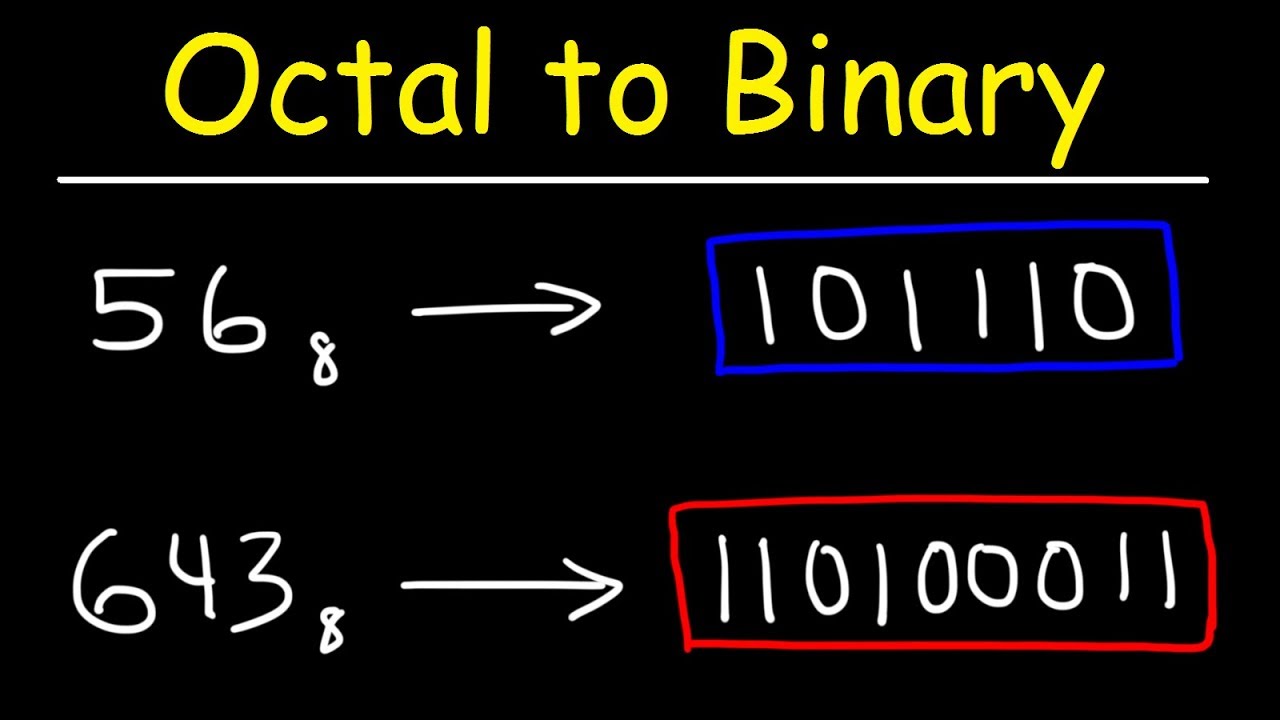
To convert the octal number 321.7 to binary, we first need to understand the conversion process. The octal number system is base-8, which means it uses 8 digits: 0, 1, 2, 3, 4, 5, 6, and 7. The binary number system, on the other hand, is base-2, using only 2 digits: 0 and 1. To convert from octal to binary, we convert each octal digit into its equivalent binary representation.
Understanding Octal to Binary Conversion
The conversion process involves replacing each octal digit with its binary equivalent. For instance, the octal digit 0 is equivalent to binary 000, the octal digit 1 is equivalent to binary 001, and so on up to the octal digit 7, which is equivalent to binary 111. To convert 321.7 octal to binary, we break down the number into its whole and fractional parts and convert each part separately. The whole part, 321, is converted by replacing each digit with its binary equivalent. The fractional part, 0.7, is converted by multiplying it by 2 and taking the integer part as either 0 or 1, then repeating the process with the remaining fraction until the desired precision is reached.
- The octal digit 3 is converted to binary as 011.
- The octal digit 2 is converted to binary as 010.
- The octal digit 1 is converted to binary as 001.
Converting the Whole Part
Converting the whole part of the number, 321, involves replacing each octal digit with its binary representation. So, 3 in octal is 011 in binary, 2 in octal is 010 in binary, and 1 in octal is 001 in binary. Combining these gives us the binary representation of the whole part.
- Replace each octal digit with its binary equivalent: 3 = 011, 2 = 010, 1 = 001.
- Combine the binary digits: 011010001.
- Ensure the conversion is accurate by double-checking each digit's replacement.
Converting the Fractional Part
The fractional part, 0.7, is converted by repeatedly multiplying by 2 and taking the integer part as the next binary digit. If the result is 1, the next binary digit is 1; if it's 0, the next binary digit is 0. This process continues until the fraction becomes 0 or the desired level of precision is reached.
- Multiply 0.7 by 2 to get 1.4, the integer part is 1, so the first binary digit is 1.
- Multiply 0.4 by 2 to get 0.8, the integer part is 0, so the next binary digit is 0.
- Continue this process: 0.8 2 = 1.6, next binary digit is 1; 0.6 2 = 1.2, next binary digit is 1.
Combining the Whole and Fractional Parts
Once both the whole and fractional parts are converted, they are combined with a binary point (similar to a decimal point in the decimal system) to form the complete binary representation of the original octal number.
- Whole part binary representation: 011010001.
- Fractional part binary representation, for simplicity, let's assume it converts to 1.011 (this step requires the multiplication process described earlier).
- Combining both parts with a binary point: 011010001.1011.
Accuracy and Precision in Conversion
It's crucial to ensure accuracy and precision in the conversion process. Accuracy refers to how close the conversion is to the true value, while precision refers to the number of digits used to represent the number. In converting 321.7 octal to binary, both aspects are important to avoid errors.
- Double-check the conversion of each octal digit to its binary equivalent for accuracy.
- Determine the required precision for the fractional part and ensure the conversion process meets this requirement.
- Use the correct method for converting the fractional part to avoid precision errors.
What is 223 octal in binary?

To convert the octal number 223 to binary, we need to understand the positional notation of the octal system and then convert each digit to its binary equivalent. The octal system is base 8, which means each digit can have 8 different values (0-7). In contrast, the binary system is base 2, with each digit having 2 possible values (0 or 1). We convert 223 in octal to binary by first converting each octal digit to its binary representation and then combining these binary digits.
Understanding Octal to Binary Conversion
The conversion process involves understanding the positional notation of both number systems. Each digit in an octal number represents a power of 8, similar to how each digit in a binary number represents a power of 2. The rightmost digit represents $8^0$, the next one to the left represents $8^1$, and so on. To convert from octal to binary, we replace each octal digit with its 3-bit binary equivalent because $2^3 = 8$, which matches the base of the octal system. For example, the octal digit 2 is equivalent to the binary number 010.
- The first step in converting 223 octal to binary is to convert each octal digit into its binary equivalent.
- Then, we combine these binary numbers to form the final binary representation of the octal number.
- Understanding the binary representation of each octal digit is crucial for accurate conversion.
Converting Each Octal Digit to Binary
To convert the octal number 223 to binary, we break it down:
- The rightmost digit is 3, which in binary is 011.
- The middle digit is 2, which in binary is 010.
- The leftmost digit is 2, which in binary is also 010.
We then combine the binary representations of each digit to get the binary equivalent of the octal number 223.
- The binary equivalent of the octal digit 3 is 011.
- The binary representation of the octal digit 2 is 010.
- Combining these binary numbers gives us the binary representation of 223 octal.
Combining Binary Equivalents
By combining the binary equivalents of each octal digit, we get 010010011 as the binary representation of 223 in octal. This binary number is the direct conversion of the octal number 223 into the binary system.
- The combined binary number is 010010011.
- This binary representation is the result of converting 223 from octal to binary.
- Understanding the conversion process is key to performing such conversions accurately.
Importance of Positional Notation
The positional notation of number systems is crucial for conversions between different bases. In the case of converting from octal to binary, understanding that each octal digit corresponds to a 3-bit binary number due to the base 8 to base 2 conversion is essential.
- Positional notation helps in understanding the relationship between different number systems.
- The base of a number system determines the number of digits used in its representation.
- Converting between number systems requires understanding their bases and positional notations.
Applications of Octal and Binary Conversions
Conversions between octal and binary are important in computer programming, especially when working with operating systems and programming languages that may use octal notation for permissions or memory addresses.
- Computer programming often involves conversions between different number systems.
- Operating systems use octal notation for file permissions.
- Understanding number system conversions is essential for software development and computer science applications.
How do you convert octal numbers into binary 225 8?

To convert octal numbers into binary, you need to understand the relationship between these two number systems. The given octal number is 225 in base 8. To convert it into binary, you first need to convert each octal digit into its binary equivalent, since each octal digit corresponds to exactly three binary digits.
Understanding Octal and Binary Number Systems
The octal number system is base 8, meaning it uses 8 distinct symbols: 0, 1, 2, 3, 4, 5, 6, and 7. The binary number system is base 2, using only two symbols: 0 and 1. To convert from octal to binary, you convert each octal digit into its 3-digit binary equivalent. For example, the octal digit 0 is equivalent to the binary number 000, the octal digit 1 is equivalent to 001, and so on up to 7 being equivalent to 111. This understanding is crucial for the conversion process.
Step-by-Step Conversion of 225 in Octal to Binary
To convert 225 in octal to binary, follow these steps:
- Convert each octal digit into its binary equivalent. For 2, the binary equivalent is 010. For 2, it's also 010. For 5, the binary equivalent is 101.
- Combine these binary numbers to get the final binary representation of the octal number 225.
- Ensure each binary digit is correctly aligned with its corresponding octal digit to maintain the integrity of the conversion.
This process ensures that the conversion is accurate and reflects the binary equivalent of the given octal number.
Importance of Binary Conversion in Computing
The conversion of octal numbers to binary is significant in computing as it allows for the execution of instructions by the computer's processor, which only understands binary code. The process involves:
- Understanding that computers only process information in binary form.
- Recognizing that programming languages often use octal or hexadecimal for convenience, but ultimately, these are converted to binary for execution.
- Noting that the conversion process is essential for the development of software and the functioning of computer hardware.
This highlights the fundamental role of binary conversion in the operation of digital systems.
Tools and Methods for Octal to Binary Conversion
There are various tools and methods available for converting octal numbers to binary, including:
- Manual conversion using the method described, where each octal digit is replaced by its binary equivalent.
- Calculators and software programs designed to perform numerical conversions, including from octal to binary.
- Programming languages that can perform the conversion as part of their functionality, using built-in functions or libraries.
These tools and methods make the conversion process simpler and more efficient, especially for large numbers or when performing frequent conversions.
Common Applications of Octal to Binary Conversion
The conversion of octal to binary has several common applications, including:
- Computer programming, where understanding and converting between different number systems is crucial for developing software and interacting with hardware.
- Data storage and transmission, where data may be represented in octal or hexadecimal for convenience but needs to be converted to binary for processing or storage.
- Cryptography and coding theory, where different number systems are used for encryption and decryption processes, and conversions between them are necessary.
These applications rely on the ability to convert between number systems efficiently and accurately, making the understanding of octal to binary conversion a fundamental skill in these fields.
Frequently Asked Questions (FAQs)
What is the Octal to Binary Conversion Calculator and how does it work?
The Octal to Binary Conversion Calculator is a tool used to convert octal numbers to their equivalent binary numbers. This calculator works by taking an octal number as input and then converting it into a binary number using a specific algorithm. The algorithm involves converting each octal digit to its equivalent binary digits. This is done by using the binary representation of each octal digit, where each octal digit is replaced by its corresponding 3-bit binary code. For example, the octal digit 0 is replaced by the binary code 000, the octal digit 1 is replaced by the binary code 001, and so on. The resulting binary codes are then combined to form the final binary number.
What are the benefits of using the Octal to Binary Conversion Calculator?
The Octal to Binary Conversion Calculator provides several benefits to users who need to convert octal numbers to binary numbers. One of the main benefits is that it saves time and reduces errors. Manual conversion of octal numbers to binary numbers can be a tedious and time-consuming process, and it is also prone to errors. The calculator eliminates these errors by providing an accurate and fast conversion. Additionally, the calculator is easy to use and does not require any technical expertise. Users can simply enter the octal number and the calculator will provide the equivalent binary number. This makes it a useful tool for students, programmers, and engineers who work with binary code and octal numbers.
How to use the Octal to Binary Conversion Calculator effectively?
To use the Octal to Binary Conversion Calculator effectively, users need to follow a few simple steps. First, they need to enter the octal number they want to convert in the input field. The octal number should be entered without any spaces or special characters. Next, users need to click on the convert button to initiate the conversion process. The calculator will then display the equivalent binary number in the output field. Users can also use the calculator to convert multiple octal numbers by separating them with commas or spaces. The calculator will then convert each octal number separately and display the corresponding binary numbers. It is also important to note that the calculator can handle large octal numbers and provide accurate results.
What are the limitations of the Octal to Binary Conversion Calculator?
The Octal to Binary Conversion Calculator has some limitations that users need to be aware of. One of the main limitations is that it can only convert octal numbers to binary numbers and not vice versa. If users need to convert binary numbers to octal numbers, they will need to use a different calculator or tool. Additionally, the calculator can only handle non-negative octal numbers and does not support negative octal numbers or fractions. Users should also note that the calculator is a software tool and may be subject to technical errors or glitches. However, the calculator is designed to provide accurate results and is regularly updated to ensure smooth operation. Despite these limitations, the calculator remains a useful tool for anyone who needs to convert octal numbers to binary numbers.
Deja una respuesta
Entradas Relacionadas