
What is the difference between SaaS, PaaS and IaaS with real life examples?


In the rapidly evolving world of cloud computing, understanding the distinctions between SaaS, PaaS, and IaaS is crucial for businesses and individuals alike. These three service models—Software as a Service (SaaS), Platform as a Service (PaaS), and Infrastructure as a Service (IaaS)—form the backbone of modern cloud solutions, each offering unique benefits and use cases. SaaS delivers ready-to-use applications over the internet, PaaS provides a platform for developers to build and deploy applications, and IaaS offers virtualized computing resources. By exploring real-life examples, this article aims to clarify these differences, helping readers choose the right model for their specific needs.
- What is the Difference Between SaaS, PaaS, and IaaS with Real-Life Examples?
- What is SaaS, PaaS, and IaaS with examples?
- What is an example of IaaS in real life?
-
What is a real time example of PaaS in cloud computing?
- What is a Real-Time Example of PaaS in Cloud Computing?
- How Does Google App Engine Work as a PaaS?
- What Are the Key Features of Google App Engine?
- What Are the Benefits of Using Google App Engine?
- What Are Some Use Cases for Google App Engine?
- How Does Google App Engine Compare to Other PaaS Solutions?
- Is Netflix an example of IaaS PaaS SaaS?
- Frequently Asked Questions (FAQ)
What is the Difference Between SaaS, PaaS, and IaaS with Real-Life Examples?
Understanding SaaS (Software as a Service)
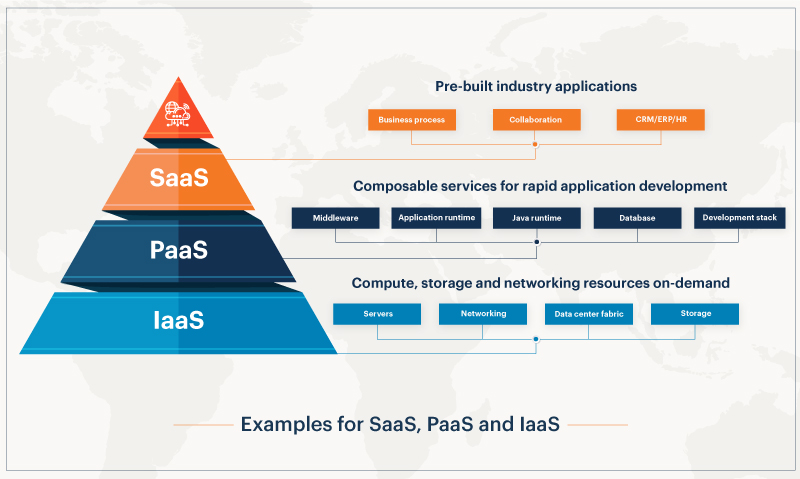
SaaS is a cloud computing model where software applications are delivered over the internet on a subscription basis. Users can access these applications via a web browser without needing to install or maintain any software locally. A real-life example of SaaS is Google Workspace, which includes tools like Gmail, Google Docs, and Google Sheets. These applications are hosted on Google's servers, and users can access them from any device with an internet connection.
Exploring PaaS (Platform as a Service)
PaaS provides a platform that allows developers to build, deploy, and manage applications without worrying about the underlying infrastructure. This model is ideal for developers who want to focus on coding rather than managing servers or storage. A real-life example of PaaS is Heroku, which offers a cloud platform that supports multiple programming languages and frameworks, enabling developers to deploy applications quickly and efficiently.
Delving into IaaS (Infrastructure as a Service)
IaaS offers virtualized computing resources over the internet, such as virtual machines, storage, and networking. This model provides the most flexibility and control over the IT infrastructure. A real-life example of IaaS is Amazon Web Services (AWS), which provides scalable computing resources that businesses can use to host websites, store data, or run applications without investing in physical hardware.
Comparing SaaS, PaaS, and IaaS
To better understand the differences between these cloud service models, let's compare them based on key features:
| Feature | SaaS | PaaS | IaaS |
|---|---|---|---|
| Control | Least control | Moderate control | Most control |
| Maintenance | Managed by provider | Provider manages infrastructure | User manages infrastructure |
| Scalability | High | High | High |
| Use Case | End-user applications | Application development | Infrastructure hosting |
Real-Life Examples of SaaS, PaaS, and IaaS
Here are some real-life examples to illustrate the practical applications of each cloud service model:
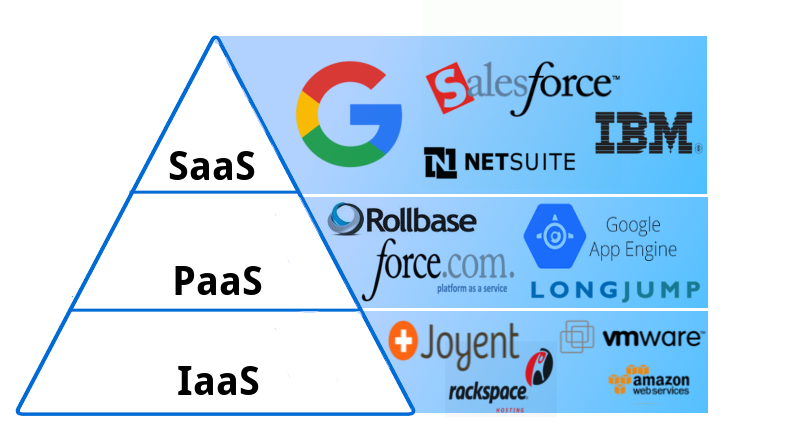
- SaaS: Microsoft 365 offers productivity tools like Word, Excel, and PowerPoint online.
- PaaS: Google App Engine allows developers to build and host applications on Google's infrastructure.
- IaaS: Microsoft Azure provides virtual machines, storage, and networking for businesses to build and manage their IT infrastructure.
Choosing the Right Cloud Service Model
Selecting the appropriate cloud service model depends on your specific needs:
- Choose SaaS if you need ready-to-use applications without worrying about maintenance.
- Opt for PaaS if you are a developer looking for a platform to build and deploy applications.
- Go for IaaS if you require full control over your infrastructure and want to manage it yourself.
What is SaaS, PaaS, and IaaS with examples?

What is SaaS (Software as a Service)?
SaaS, or Software as a Service, is a cloud computing model where software applications are delivered over the internet on a subscription basis. Users can access these applications through a web browser without needing to install or maintain any software locally. Examples of SaaS include:
- Google Workspace: A suite of productivity tools like Gmail, Google Docs, and Google Drive.
- Salesforce: A customer relationship management (CRM) platform used for sales, marketing, and customer service.
- Microsoft 365: A collection of office applications such as Word, Excel, and PowerPoint, accessible online.
What is PaaS (Platform as a Service)?
PaaS, or Platform as a Service, provides a cloud-based platform for developers to build, deploy, and manage applications without worrying about the underlying infrastructure. It includes tools, libraries, and services to streamline development. Examples of PaaS include:
- Heroku: A platform that supports multiple programming languages and frameworks for app development.
- Google App Engine: A service that allows developers to build and host applications on Google's infrastructure.
- Microsoft Azure App Services: A platform for creating web and mobile apps with integrated tools and services.
What is IaaS (Infrastructure as a Service)?
IaaS, or Infrastructure as a Service, offers virtualized computing resources over the internet, such as virtual machines, storage, and networking. Users have full control over the infrastructure but do not need to manage physical hardware. Examples of IaaS include:
- Amazon Web Services (AWS) EC2: Provides scalable virtual servers for running applications.
- Microsoft Azure Virtual Machines: Allows users to deploy and manage virtual machines in the cloud.
- Google Compute Engine: Offers customizable virtual machines for various workloads.
Key Differences Between SaaS, PaaS, and IaaS
The main differences between SaaS, PaaS, and IaaS lie in the level of control and responsibility they offer:
- SaaS: Users only manage the application and data, while the provider handles everything else.
- PaaS: Developers manage applications and data, while the provider manages the platform and infrastructure.
- IaaS: Users manage applications, data, and operating systems, while the provider manages the hardware and virtualization.
When to Use SaaS, PaaS, or IaaS?
Choosing between SaaS, PaaS, and IaaS depends on the specific needs of a business or project:
- SaaS: Ideal for businesses that need ready-to-use applications without technical maintenance.
- PaaS: Best for developers who want to focus on coding without managing the underlying infrastructure.
- IaaS: Suitable for organizations that require full control over their computing resources and infrastructure.
What is an example of IaaS in real life?
What is an Example of IaaS in Real Life?
An example of Infrastructure as a Service (IaaS) in real life is the use of Amazon Web Services (AWS) EC2. AWS EC2 provides virtual servers in the cloud, allowing businesses to run applications without needing to invest in physical hardware. Users can scale resources up or down based on demand, pay only for what they use, and manage their virtual servers remotely.
How Does AWS EC2 Demonstrate IaaS?
AWS EC2 is a prime example of IaaS because it offers:
- Virtual Machines (VMs): Users can create and manage virtual servers tailored to their specific needs.
- Scalability: Resources can be adjusted dynamically to handle varying workloads.
- Pay-as-You-Go Pricing: Businesses only pay for the compute power and storage they actually use.
Why Do Companies Use IaaS Like AWS EC2?
Companies use IaaS solutions like AWS EC2 for several reasons:
- Cost Efficiency: Eliminates the need for upfront hardware investments and reduces maintenance costs.
- Flexibility: Allows businesses to quickly adapt to changing demands without physical infrastructure constraints.
- Global Reach: Provides access to data centers worldwide, ensuring low latency and high availability.
What Are the Key Features of IaaS?
The key features of IaaS include:
- On-Demand Resources: Users can provision resources instantly as needed.
- Self-Service Management: Users have full control over their virtual infrastructure.
- Automated Scaling: Systems can automatically adjust resources based on traffic or workload.
How Does IaaS Benefit Startups?
IaaS is particularly beneficial for startups because:
- Low Initial Costs: Startups can avoid large capital expenditures on hardware.
- Rapid Deployment: Applications can be launched quickly without delays caused by setting up physical infrastructure.
- Focus on Core Business: Startups can concentrate on developing their products rather than managing IT infrastructure.
What is a real time example of PaaS in cloud computing?
What is a Real-Time Example of PaaS in Cloud Computing?
A real-time example of Platform as a Service (PaaS) in cloud computing is Google App Engine. It allows developers to build, deploy, and scale applications without managing the underlying infrastructure. Developers can focus on writing code while Google handles the servers, storage, and networking.
How Does Google App Engine Work as a PaaS?
Google App Engine operates as a PaaS by providing a fully managed environment for application development. Here’s how it works:
- Automatic Scaling: The platform automatically adjusts resources based on traffic, ensuring optimal performance.
- Integrated Services: It offers built-in services like databases, caching, and user authentication, reducing development time.
- Multi-Language Support: Developers can use languages like Python, Java, Go, and Node.js to build applications.
What Are the Key Features of Google App Engine?
Google App Engine provides several features that make it a powerful PaaS solution:
- Serverless Architecture: Developers do not need to manage servers, as Google handles all infrastructure.
- High Availability: Applications are hosted on Google’s global infrastructure, ensuring minimal downtime.
- Security: Built-in security features protect applications from threats and vulnerabilities.
What Are the Benefits of Using Google App Engine?
Using Google App Engine as a PaaS offers numerous advantages:
- Cost Efficiency: Pay only for the resources you use, with no upfront infrastructure costs.
- Rapid Development: Pre-configured tools and services accelerate the development process.
- Global Reach: Applications can be deployed globally with low latency, thanks to Google’s data centers.
What Are Some Use Cases for Google App Engine?
Google App Engine is ideal for various use cases, including:
- Web Applications: Building and hosting scalable web applications with ease.
- Mobile Backends: Providing backend services for mobile apps, such as APIs and databases.
- IoT Applications: Handling data processing and analytics for Internet of Things (IoT) devices.
How Does Google App Engine Compare to Other PaaS Solutions?
Google App Engine stands out among other PaaS solutions due to its unique features:
- Integration with Google Cloud: Seamless integration with other Google Cloud services like BigQuery and Cloud Storage.
- Flexibility: Supports both standard and flexible environments, catering to different application needs.
- Developer-Friendly: Offers extensive documentation, SDKs, and tools to simplify development.
Is Netflix an example of IaaS PaaS SaaS?
Is Netflix an Example of IaaS?
Netflix is not an example of Infrastructure as a Service (IaaS). IaaS refers to cloud services that provide virtualized computing resources over the internet, such as virtual machines, storage, and networking. Netflix, however, does not offer these services to its users. Instead, Netflix relies on IaaS providers like AWS (Amazon Web Services) to host its infrastructure. Key points include:
- Netflix uses AWS for its computing and storage needs.
- IaaS is about providing raw infrastructure, which Netflix consumes rather than provides.
- Netflix focuses on delivering content, not infrastructure services.
Is Netflix an Example of PaaS?
Netflix is not an example of Platform as a Service (PaaS). PaaS provides a platform allowing customers to develop, run, and manage applications without dealing with the underlying infrastructure. Netflix does not offer a development platform to its users. Instead, it uses PaaS-like services internally to build and manage its streaming platform. Key points include:
- Netflix leverages PaaS tools for its internal development processes.
- PaaS is aimed at developers, while Netflix targets end-users with its streaming service.
- Netflix does not provide a platform for third-party application development.
Is Netflix an Example of SaaS?
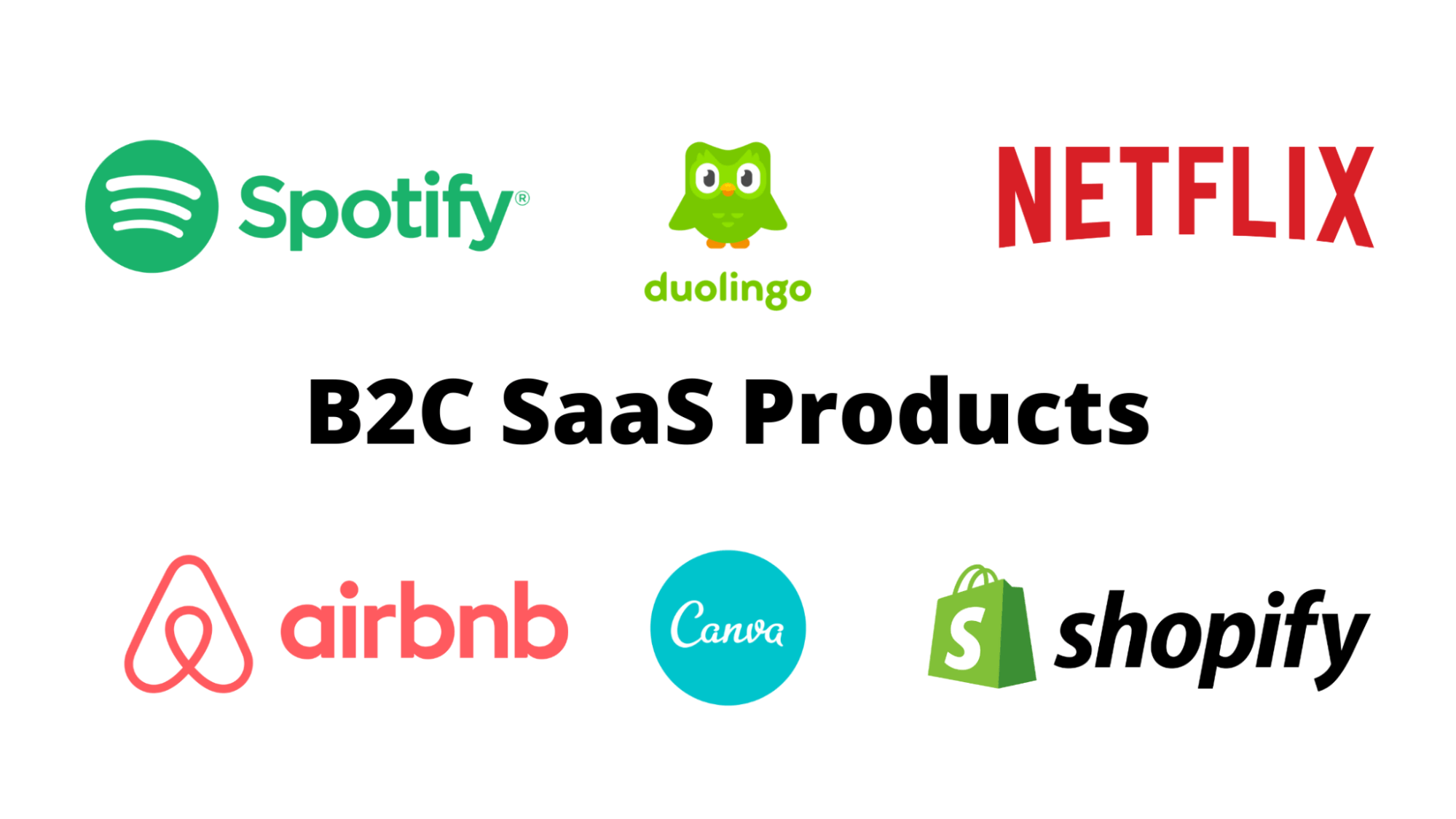
Netflix is a prime example of Software as a Service (SaaS). SaaS delivers software applications over the internet, eliminating the need for users to install or maintain the software. Netflix provides its streaming service directly to consumers, making it a SaaS offering. Key points include:
- Netflix delivers its streaming platform via the internet.
- Users access Netflix without needing to install software locally.
- Netflix handles all updates, maintenance, and infrastructure management.
How Does Netflix Utilize Cloud Services?
Netflix extensively utilizes cloud services, particularly from AWS, to power its streaming platform. While Netflix itself is a SaaS provider, it relies on IaaS and PaaS solutions from AWS to manage its infrastructure and development processes. Key points include:
- Netflix uses AWS for scalable storage and computing resources.
- It employs PaaS tools for continuous integration and deployment.
- Netflix's reliance on cloud services ensures high availability and scalability.
What Makes Netflix a SaaS Provider?
Netflix qualifies as a SaaS provider because it delivers a fully functional software application—its streaming service—over the internet. Users can access Netflix on various devices without needing to manage any underlying technology. Key points include:
- Netflix's service is accessible via web browsers and apps.
- All backend operations, including updates and maintenance, are handled by Netflix.
- Users pay a subscription fee for access to the service, a hallmark of SaaS models.
Frequently Asked Questions (FAQ)
What is SaaS, and can you provide a real-life example?
SaaS (Software as a Service) is a cloud computing model where software applications are delivered over the internet on a subscription basis. Instead of installing and maintaining software on individual devices, users access the application via a web browser. A real-life example of SaaS is Google Workspace (formerly G Suite), which includes tools like Gmail, Google Docs, and Google Sheets. These applications are hosted on Google's servers, and users can access them from anywhere with an internet connection, eliminating the need for local installations.
What is PaaS, and how does it differ from SaaS?
PaaS (Platform as a Service) provides a platform and environment for developers to build, deploy, and manage applications without worrying about the underlying infrastructure. Unlike SaaS, which delivers ready-to-use software, PaaS offers tools and frameworks for creating custom applications. A real-life example of PaaS is Heroku, a platform that allows developers to deploy, manage, and scale applications without dealing with server management or hardware. PaaS is ideal for developers who want to focus on coding rather than infrastructure.
What is IaaS, and how is it used in real-world scenarios?
IaaS (Infrastructure as a Service) provides virtualized computing resources over the internet, such as virtual machines, storage, and networking. It offers the most flexibility and control over the infrastructure compared to SaaS and PaaS. A real-world example of IaaS is Amazon Web Services (AWS), which offers services like EC2 (Elastic Compute Cloud) for virtual servers and S3 (Simple Storage Service) for scalable storage. Businesses use IaaS to host websites, run applications, or store data without investing in physical hardware.
How do SaaS, PaaS, and IaaS differ in terms of user responsibility?
The key difference between SaaS, PaaS, and IaaS lies in the level of responsibility the user has. In SaaS, the provider manages everything, including the application, data, and infrastructure, so users only need to focus on using the software. With PaaS, the provider handles the infrastructure and runtime environment, while users manage the applications and data they develop. In IaaS, users have the most responsibility, as they manage the operating systems, applications, and data, while the provider only maintains the physical hardware and virtualization layer. This distinction helps businesses choose the right model based on their technical expertise and needs.
Deja una respuesta
Entradas Relacionadas