
Binary to Octal Conversion Calculator

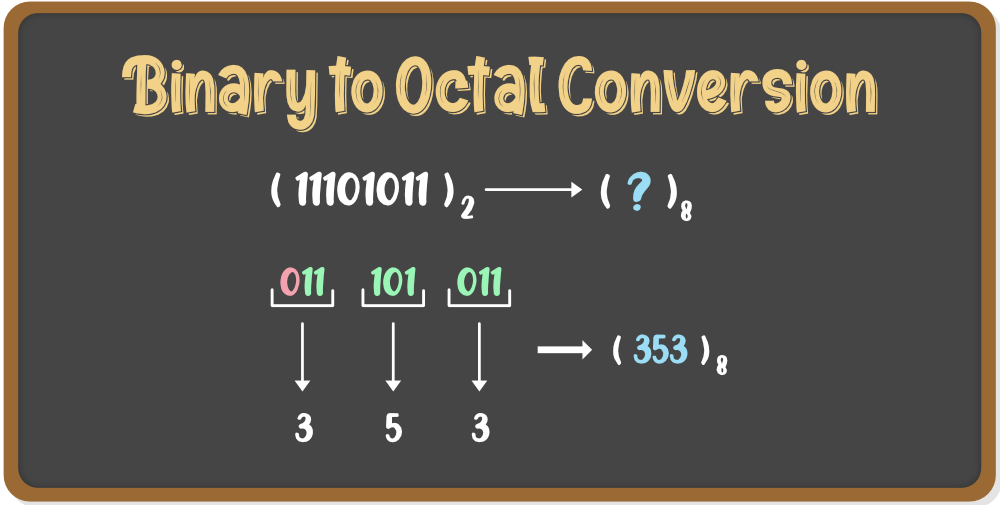
The Binary to Octal Conversion Calculator is a useful tool for converting binary numbers to their equivalent octal representations. Binary and octal are two different number systems used in computer programming and mathematics. Binary is a base-2 system, while octal is a base-8 system. This calculator simplifies the process of converting between these two systems, saving time and reducing errors. It is particularly helpful for students, programmers, and engineers who work with binary and octal numbers on a regular basis, providing an efficient and accurate way to perform conversions. Its functionality is straightforward and easy to use.
- Binary to Octal Conversion Calculator: A Comprehensive Guide
- How do you convert binary to octal?
- How do you convert 01101010 binary to octal?
- What is 001101 to octal?
- How to convert 11001 binary to octal?
-
Frequently Asked Questions (FAQs)
- What is the Binary to Octal Conversion Calculator and how does it work?
- How do I use the Binary to Octal Conversion Calculator to convert a binary number?
- What are the benefits of using a Binary to Octal Conversion Calculator?
- Are there any limitations or potential errors to be aware of when using a Binary to Octal Conversion Calculator?
Binary to Octal Conversion Calculator: A Comprehensive Guide
The Binary to Octal Conversion Calculator is a tool used to convert binary numbers to octal numbers. This conversion is essential in computer programming and digital electronics, where binary and octal number systems are widely used. The calculator takes a binary number as input and produces the equivalent octal number as output.
How Binary to Octal Conversion Works
The binary to octal conversion process involves dividing the binary number into groups of three digits, starting from the right. Each group of three binary digits is then converted to its equivalent octal digit. This process is based on the fact that 2^3 (8) is equal to 10 in octal, making it easier to convert between the two number systems. The conversion process can be done manually or using a calculator.
Benefits of Using a Binary to Octal Conversion Calculator
Using a Binary to Octal Conversion Calculator has several benefits, including increased accuracy and reduced time. Manual conversion can be prone to errors, especially when dealing with large binary numbers. A calculator eliminates this risk, providing fast and accurate conversions. Additionally, a calculator can handle complex conversions that may be difficult to perform manually.
How to Use a Binary to Octal Conversion Calculator
Using a Binary to Octal Conversion Calculator is straightforward. Simply enter the binary number you want to convert, and the calculator will produce the equivalent octal number. Some calculators may also provide additional features, such as conversion history and error checking. To get the most out of a calculator, it's essential to understand the basics of binary and octal number systems.
Common Applications of Binary to Octal Conversion
Binary to Octal Conversion is commonly used in various fields, including computer programming, digital electronics, and telecommunications. In computer programming, binary and octal numbers are used to represent memory addresses and data values. In digital electronics, binary and octal numbers are used to design and test digital circuits. The following table shows some common applications of binary to octal conversion:
| Application | Description |
|---|---|
| Computer Programming | Used to represent memory addresses and data values |
| Digital Electronics | Used to design and test digital circuits |
| Telecommunications | Used to represent data values and error correction codes |
Best Practices for Using a Binary to Octal Conversion Calculator
To get the most out of a Binary to Octal Conversion Calculator, it's essential to follow best practices. This includes understanding the basics of binary and octal number systems, using the calculator correctly, and verifying the results. Additionally, it's essential to choose a reliable calculator that provides accurate and fast conversions. By following these best practices, you can ensure that you get the most out of your Binary to Octal Conversion Calculator and improve your productivity. The key benefits of using a calculator include increased accuracy, reduced time, and improved productivity.
How do you convert binary to octal?
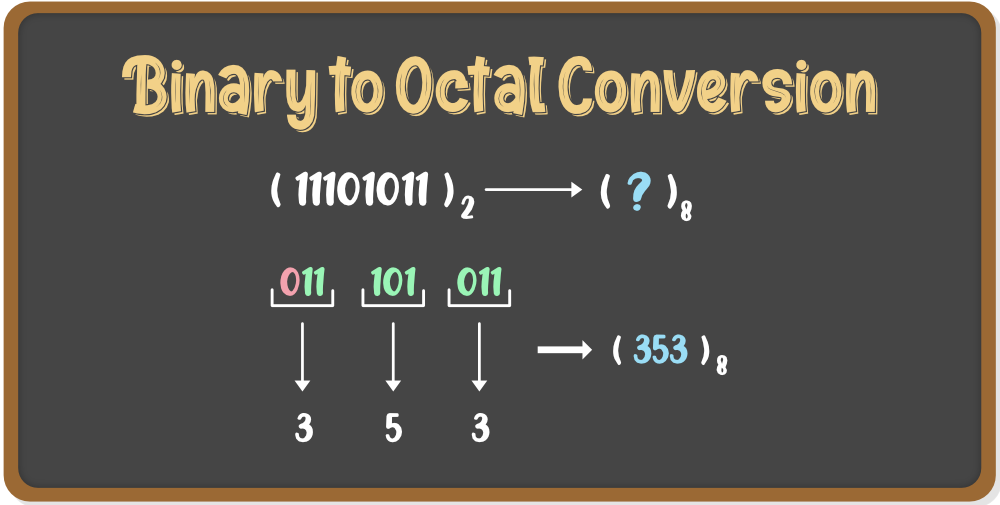
To convert binary to octal, you need to first understand the relationship between these two number systems. The binary system is a base-2 system, where each digit can be either 0 or 1, while the octal system is a base-8 system, where each digit can be from 0 to 7. To convert binary to octal, you can group the binary digits into sets of three and then convert each set to its corresponding octal digit.
Understanding Binary and Octal Number Systems
The binary and octal number systems are two different ways of representing numbers. The binary system is used by computers to perform calculations and store data, while the octal system is often used in programming and computer science. To convert binary to octal, you need to understand how to represent numbers in both systems. Here are the steps to follow:
- Learn the binary digits and their corresponding octal digits
- Understand how to group binary digits into sets of three
- Learn how to convert each set of three binary digits to its corresponding octal digit
Converting Binary to Octal Using Grouping Method
The grouping method is a simple way to convert binary to octal. This method involves grouping the binary digits into sets of three and then converting each set to its corresponding octal digit. For example, if you have the binary number 1010, you can group it into sets of three as 001 010. You can then convert each set to its corresponding octal digit: 001 = 1 and 010 = 2. Therefore, the octal equivalent of the binary number 1010 is 12. Here are the steps to follow:
- Group the binary digits into sets of three
- Convert each set of three binary digits to its corresponding octal digit
- Combine the octal digits to get the final octal number
Using Conversion Tables to Convert Binary to Octal
A conversion table is a table that shows the corresponding octal digits for each binary digit or set of digits. You can use a conversion table to quickly convert binary to octal. For example, if you have the binary number 1101, you can look up the corresponding octal digit in the conversion table: 1101 = 15. Therefore, the octal equivalent of the binary number 1101 is 15. Here are the steps to follow:
- Find a conversion table that shows the corresponding octal digits for each binary digit or set of digits
- Look up the corresponding octal digit for each binary digit or set of digits
- Combine the octal digits to get the final octal number
Converting Binary to Octal Using Programming Languages
You can also use programming languages to convert binary to octal. For example, in Python, you can use the int function to convert a binary number to an integer, and then use the oct function to convert the integer to an octal number. For example, if you have the binary number 1010, you can convert it to an integer using the int function: int('1010', 2) = 10. You can then convert the integer to an octal number using the oct function: oct(10) = 12. Here are the steps to follow:
- Choose a programming language that supports binary and octal conversions
- Use the programming language to convert the binary number to an integer
- Use the programming language to convert the integer to an octal number
Common Errors to Avoid When Converting Binary to Octal
When converting binary to octal, there are several common errors to avoid. For example, you should make sure to group the binary digits correctly, and you should make sure to use the correct conversion table or programming language. You should also make sure to double-check your work to avoid errors. Here are some common errors to avoid:
- Incorrect grouping of binary digits
- Using the wrong conversion table or programming language
- Failing to double-check your work
How do you convert 01101010 binary to octal?
To convert 01101010 binary to octal, you need to follow a series of steps. First, you need to divide the binary number into groups of three digits, starting from the right. In this case, the binary number 01101010 can be divided into 011 and 010 and 10. Then, you need to convert each group of three binary digits to its equivalent octal digit.
Understanding Binary and Octal Number Systems
The binary number system is a base-2 number system that uses only two digits: 0 and 1. The octal number system, on the other hand, is a base-8 number system that uses eight digits: 0, 1, 2, 3, 4, 5, 6, and 7. To convert binary to octal, you need to understand the relationship between these two number systems. Here are the steps to follow:
- Divide the binary number into groups of three digits, starting from the right.
- Convert each group of three binary digits to its equivalent octal digit.
- Combine the octal digits to form the final octal number.
Converting Binary to Octal: A Step-by-Step Process
The process of converting binary to octal involves several steps. First, you need to divide the binary number into groups of three digits. Then, you need to convert each group of three binary digits to its equivalent octal digit. This can be done using a binary-to-octal conversion table or by using a calculator. Here are the steps to follow:
- Divide the binary number 01101010 into groups of three digits: 011, 010, and 10.
- Convert each group of three binary digits to its equivalent octal digit: 011 = 3, 010 = 2, and 10 = 2.
- Combine the octal digits to form the final octal number: 32.
Using a Binary-to-Octal Conversion Table
A binary-to-octal conversion table is a table that shows the equivalent octal digits for each group of three binary digits. This table can be used to convert binary numbers to octal numbers quickly and easily. Here are the steps to follow:
- Find the binary-to-octal conversion table.
- Look up the equivalent octal digit for each group of three binary digits.
- Combine the octal digits to form the final octal number.
Converting Binary to Octal Using a Calculator
A calculator can be used to convert binary numbers to octal numbers quickly and easily. Most calculators have a binary-to-octal conversion function that can be used to convert binary numbers to octal numbers. Here are the steps to follow:
- Enter the binary number into the calculator.
- Use the binary-to-octal conversion function to convert the binary number to octal.
- Read the octal number from the calculator display.
Common Mistakes to Avoid When Converting Binary to Octal
There are several common mistakes that can be made when converting binary numbers to octal numbers. One of the most common mistakes is failing to divide the binary number into groups of three digits correctly. Another common mistake is failing to use the correct binary-to-octal conversion table or function. Here are the steps to follow to avoid these mistakes:
- Make sure to divide the binary number into groups of three digits correctly.
- Use the correct binary-to-octal conversion table or function.
- Double-check the octal number to make sure it is correct.
What is 001101 to octal?

To convert the binary number 001101 to octal, we first need to understand the binary and octal number systems. The binary system is a base-2 number system that uses only two digits: 0 and 1. The octal system, on the other hand, is a base-8 number system that uses eight digits: 0 through 7.
Understanding Binary to Octal Conversion
The process of converting binary to octal involves grouping the binary digits into sets of three, starting from the right. Each set of three binary digits corresponds to a single octal digit. For the binary number 001101, we group the digits as 001 and 101. Then, we convert each group to its corresponding octal digit.
- The binary group 001 corresponds to the octal digit 1 because 1 in binary is equal to 1 in octal.
- The binary group 101 corresponds to the octal digit 5 because 101 in binary equals 5 in octal.
- Combining these, 001101 in binary is 15 in octal.
Importance of Base in Number Systems
The base of a number system is crucial as it determines the place value of each digit. In the octal system, each digit's place value is a power of 8. Understanding the base helps in converting between different number systems, including binary to octal.
- The base helps in determining the place value of each digit in a number.
- Conversions between number systems rely heavily on understanding the base of each system.
- Binary and octal conversions are simplified by knowing the base and its implications on digit place value.
Applications of Binary and Octal Number Systems
Binary and octal number systems have practical applications in computer programming and electronic devices. Binary is used for machine code, while octal is sometimes preferred for its compactness and easier conversion to and from binary.
- Binary is fundamental in computer programming as it represents the basic language that computers understand.
- Octal is used in Unix permissions and other areas where a compact representation of binary data is useful.
- Both binary and octal are essential for low-level programming and understanding computer architecture.
Conversion Techniques
There are several techniques for converting binary to octal, including grouping binary digits into sets of three and using conversion tables or calculators. Each method has its advantages and is chosen based on the context and personal preference.
- Grouping is a common method where binary digits are grouped into sets of three for octal conversion.
- Conversion tables provide a quick reference for converting between binary and octal.
- Calculators can also be used for direct conversion, offering a fast and accurate method.
Challenges in Conversion
One of the challenges in converting binary to octal is ensuring that the binary number is correctly grouped into sets of three digits. Additionally, understanding the place value in both binary and octal systems is crucial for accurate conversions.
- Correct grouping of binary digits is essential for accurate octal conversion.
- Understanding place value in both systems helps in avoiding common conversion mistakes.
- Practice is key to mastering binary to octal conversions and overcoming the associated challenges.
How to convert 11001 binary to octal?
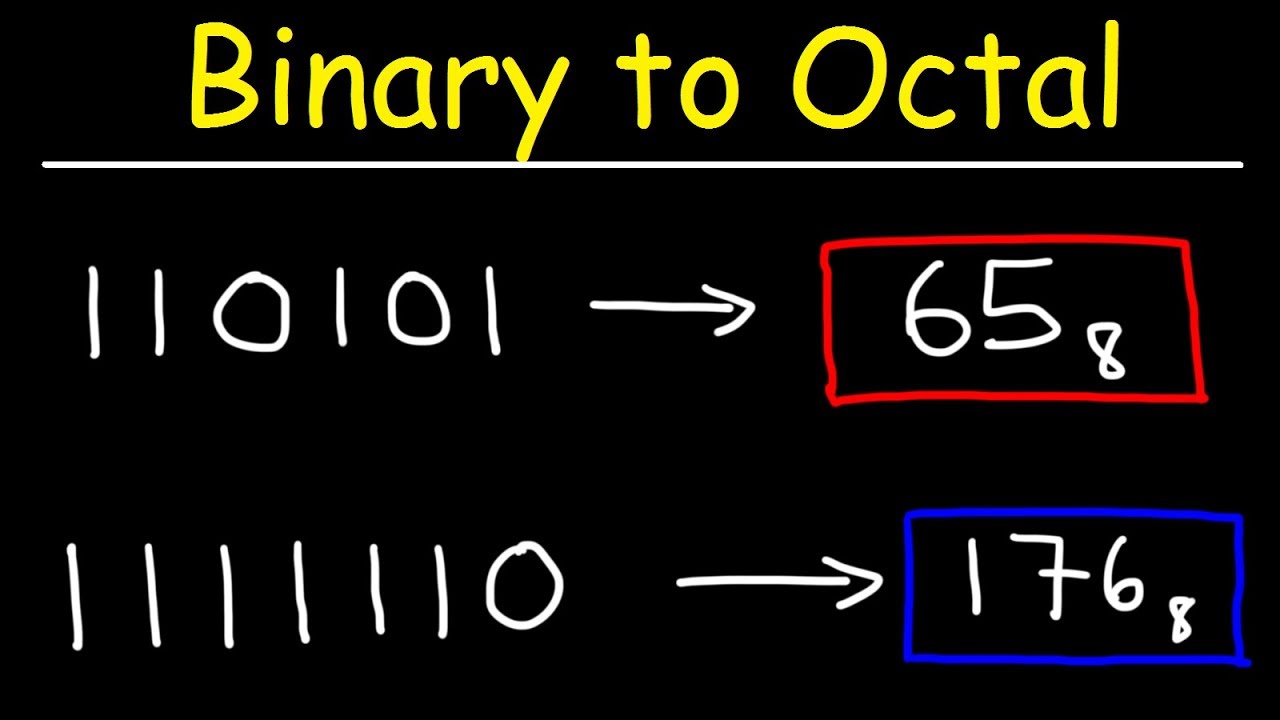
To convert 11001 binary to octal, we need to follow a series of steps. First, we need to understand the binary and octal number systems. The binary number system is a base-2 number system that uses only two digits: 0 and 1. The octal number system, on the other hand, is a base-8 number system that uses eight digits: 0, 1, 2, 3, 4, 5, 6, and 7. To convert 11001 binary to octal, we can use the following steps:
- First, we need to convert the binary number to decimal. We can do this by multiplying each digit of the binary number by the corresponding power of 2 and then adding the results.
- Next, we need to convert the decimal number to octal. We can do this by dividing the decimal number by 8 and then keeping track of the remainders.
- Finally, we need to write the remainders in reverse order to get the octal equivalent of the binary number.
Understanding Binary and Octal Number Systems
The binary number system is a base-2 number system that uses only two digits: 0 and 1. The octal number system, on the other hand, is a base-8 number system that uses eight digits: 0, 1, 2, 3, 4, 5, 6, and 7. To convert 11001 binary to octal, we need to understand how these two number systems work.
- The binary number system is used in computers and other electronic devices because it is easy to implement using electronic switches.
- The octal number system is used in some programming languages and operating systems because! it is more compact than the binary number system.
- Both binary and octal number systems are used in computer science and programming because they are more efficient than the decimal number system.
Converting Binary to Decimal
To convert 11001 binary to decimal, we can use the following steps:
- First, we need to multiply each digit of the binary number by the corresponding power of 2.
- Next, we need to add the results to get the decimal equivalent of the binary number.
- For example, the binary number 11001 can be converted to decimal as follows: (1 x 2^4) + (1 x 2^3) + (0 x 2^2) + (0 x 2^1) + (1 x 2^0) = 16 + 8 + 0 + 0 + 1 = 25.
Converting Decimal to Octal
To convert the decimal number 25 to octal, we can use the following steps:
- First, we need to divide the decimal number by 8 and then keep track of the remainder.
- Next, we need to write the remainder in reverse order to get the octal equivalent of the decimal number.
- For example, the decimal number 25 can be converted to octal as follows: 25 divided by 8 is 3 with a remainder of 1, so the octal equivalent is 31.
Using Online Converters
There are many online converters available that can convert binary to octal. These converters use algorithms to perform the conversion and can be more accurate than manual conversion methods.
- Some online converters can also convert octal to binary and decimal.
- These converters can be useful for programmers and computer scientists who need to work with different number systems.
- However, it is still important to understand how to convert binary to octal manually, as this can help to improve problem-solving skills and understanding of computer science concepts.
Common Errors to Avoid
When converting binary to octal, there are several common errors to avoid. These errors can include mistakes in calculating the decimal equivalent of the binary number, or errors in dividing the decimal number by 8 to get the octal equivalent.
- One common error is to forget to keep track of the remainders when dividing the decimal number by 8.
- Another common error is to miscalculate the decimal equivalent of the binary number.
- To avoid these errors, it is important to double-check calculations and to use a systematic approach to conversion.
Frequently Asked Questions (FAQs)
What is the Binary to Octal Conversion Calculator and how does it work?
The Binary to Octal Conversion Calculator is a tool designed to convert binary numbers into their equivalent octal representations. This calculator works by taking a binary number as input and then using a series of algorithms to convert it into an octal number. The process involves grouping the binary digits into sets of three, starting from the right, and then converting each set into its corresponding octal digit. This is because octal numbers are base-8, which means that each digit can have one of eight possible values, ranging from 0 to 7. The calculator performs these calculations rapidly and accurately, making it a useful tool for anyone who needs to work with binary and octal numbers.
How do I use the Binary to Octal Conversion Calculator to convert a binary number?
To use the Binary to Octal Conversion Calculator, simply enter the binary number you want to convert into the input field. Make sure to enter the number correctly, using only the digits 0 and 1. Once you have entered the binary number, click the convert button to initiate the conversion process. The calculator will then display the equivalent octal number in the output field. You can also use the calculator to convert multiple binary numbers by entering each number separately and clicking the convert button each time. The calculator will remember your previous conversions, allowing you to easily compare and contrast the results. Additionally, some calculators may offer advanced features, such as the ability to convert octal numbers back into binary or to perform other types of conversions, such as decimal to hexadecimal.
What are the benefits of using a Binary to Octal Conversion Calculator?
Using a Binary to Octal Conversion Calculator offers several benefits, particularly for individuals who work with binary and octal numbers on a regular basis. One of the main advantages is speed and accuracy. The calculator can perform conversions much faster and more accurately than a human, which reduces the risk of errors and saves time. Another benefit is convenience, as the calculator is often available online or as a mobile app, making it accessible from anywhere. Furthermore, the calculator can be used to perform a wide range of conversions, including binary to octal, octal to binary, and even decimal to hexadecimal. This makes it a valuable tool for programmers, engineers, and mathematicians who need to work with different number systems.
Are there any limitations or potential errors to be aware of when using a Binary to Octal Conversion Calculator?
While the Binary to Octal Conversion Calculator is a powerful tool, there are some limitations and potential errors to be aware of. One potential issue is input errors, where the user enters an incorrect binary number. This can result in an incorrect octal conversion, which can have serious consequences in certain applications. Another limitation is the range of values that the calculator can handle. Some calculators may only be able to handle binary numbers up to a certain length, which can limit their usefulness for very large or very small numbers. Additionally, the calculator may not be able to handle special cases, such as binary numbers that contain non-numeric characters or octal numbers that are outside the range of 0 to 7. It is essential to carefully review the calculator's documentation and user guide to understand its limitations and potential errors, and to use it responsibly and with caution.
Deja una respuesta
Entradas Relacionadas